Download Motchi
for Windows.Your download
has started.
Free forever · Windows 10 & 11 (64-bit) · no admin rights needed
Open Motchi-Setup.exe when it finishes.
Download not started yet? Click here.
Your browser may say the download can’t be verified. That’s expected for a new app. Open its downloads list and click Download unverified file (or Keep). See how
Prefer no warnings at all: get it from the Microsoft Store instead.
Your browser may say the file can’t be verified. That’s normal for a new app: choose Download unverified file (or Keep).
Motchi is for Windows PCs. On your phone? Leave your email below and open the link on your PC.
If your browser or Windows warns you
Motchi is new and made by one person, so browsers and Windows haven’t seen this file often enough to vouch for it, and it isn’t signed with a paid certificate yet. You can go ahead: the file comes straight from Motchi’s public GitHub releases. The Microsoft Store version is signed by Microsoft and skips all of this.
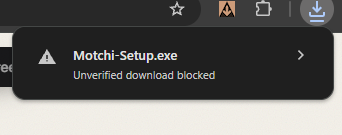
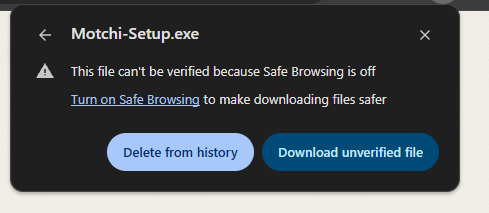
1. In your browser, open the downloads list (the download icon at the top right), click Motchi-Setup.exe, then click Download unverified file. If it says isn’t commonly downloaded instead, click Keep.
2. In Windows, click More info.
3. Click Run anyway. Motchi installs in a few seconds and appears at the top of your screen.
Every Motchi update is checked against its own release signature before it installs.
Want a hello in your inbox?
One welcome email with tips to get started (and the download link, handy if you’re on your phone). Nothing else unless you tick the box.
Getting Motchi Pro
Buy it right here or inside the app (Alt + N → Settings → Get Pro). It’s $4.99, once, for one PC. Your key arrives by email: open Motchi, go to Settings → Get Pro → I have a key and paste it.